
At TechKnowFile 2026, the ETO's Anna and Inga shared a behind-the-scenes look at how we develop online learning modules, from the first instructor conversation to final review before launch.
Presented to approximately 40 participants from across the U of T community, our session, From Concept to Course: Managing Online Module Development with Microsoft 365, explored how we use a structured workflow, supported by Microsoft 365 tools, to move from an initial idea to a fully developed online learning experience.
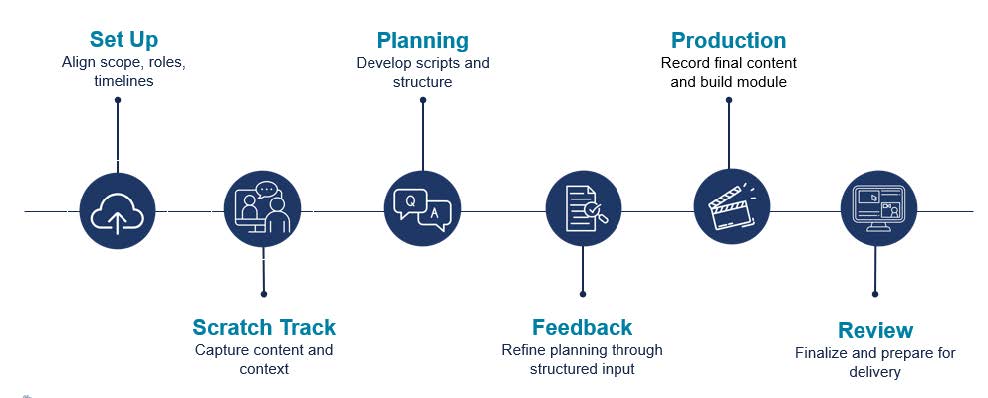
In the session, we walked participants through ETO’s six-stage framework for online module development:
- Set Up
- Scratch Track
- Planning
- Feedback
- Production
- Review
You can download the entire workflow in the resources below, but here we will highlight a few key aspects of our presentation that generated the most discussion during the session.
Building structure around collaboration
One of the key ideas we explored during the session was that online module development is rarely linear. It involves coordination between subject matter experts (SMEs), instructional and graphic designers, media producers, and reviewers. Because all this often happens across multiple timelines and platforms, it’s important to have clarity around communication, timelines, feedback, and expectations.
At the beginning of a project, we use Microsoft Teams to host kickoff meetings with SMEs and establish communication channels. In this same stage, Planner helps us organize timelines and milestones, while SharePoint gives us a centralized location for files and documentation.
As projects progress, we introduce additional Microsoft 365 tools to support different types of collaboration, including:
- Loop to capture notes and follow-up questions during scratch-track recordings
- Word for module design, video script development, and feedback
- Forms for instructor intake and learner feedback
- Excel for tracking production assets
- Clipchamp and Stream for review and delivery preparation
Throughout the session, we emphasized that what matters most is not the tools themselves, but how they help make the workflow visible and manageable.
Using the scratch track to capture context
One important aspect of our process is the scratch track stage, which was of particular interest to participants during the session.
The scratch track is an informal recording session where instructors walk through their content before formal production begins. We use this stage to capture explanations, examples, context, and natural delivery. We’ve found these recordings incredibly valuable because they provide much more context than a slide deck could on its own.
The scratch track also helps us better understand how instructors explain concepts, where examples naturally emerge, and where additional visuals, clarification, or restructuring may help support learners before we move into production.
Moving from informal conversations to structured feedback
Following the scratch track, we develop two core documents: a module design document and a video planning document. The module design document becomes the blueprint for the learning experience and includes lesson structure, learning objectives, activities, visuals, and knowledge checks. The video planning document focuses specifically on video production and helps us map scripts, visuals, and delivery approaches for all video content in the module.
One of the biggest changes in our process has been centralizing SME feedback directly within these documents using comments and track changes in Word.. Now, instead of feedback spread across emails, meetings, and Teams messages, everything lives in one place.
As a result, we now spend more time clarifying and refining content before production begins. While it may seem like a lot of work up front, this shift has helped us speed up production and minimize last-minute revisions.
Reflecting on workflow challenges
To close the session, we invited participants to reflect on their own workflows using our six-stage framework as a reference. We asked questions like:
- Where does your process break down?
- Which stage is least defined in your workflow?
- Where could better tool integration improve your process?
- What is one small change you could try?
These questions helped shift the conversation from Which tool should I use? to How do I design a sustainable process for collaborative course development?
One key takeaway was that improving collaborative development processes doesn’t require a complete overhaul. Small changes to communication, structure, or feedback practices can have a significant impact.
Download the workflow and presentation
During the session, we shared a downloadable one-page version of our framework that summarizes each stage alongside example Microsoft 365 tools.
- Download the From Concept to Course: ETO Workflow (PDF)
- Download the full TKF 2026: From Concept to Course slide deck (PDF)
For more information about Microsoft 365 tools at the University of Toronto, explore: