
We’ll use this space to share updates (e.g., new tools, new features, improved functionality) about Quercus and other Academic Toolbox tools.
This update: SpeedGrader performance and usability upgrades, Gradebook visibility and scheduling enhancements, and a new grading interface for Crowdmark.
In this update:
This month’s Quercus and Academic Toolbox update introduces performance and usability upgrades for SpeedGrader, new Gradebook enhancements (including hidden grades indicators and scheduled feedback), and a more user-friendly grading interface in Crowdmark.
- SpeedGrader: Performance and usability upgrades
- Gradebook: New visibility and scheduling features
- Crowdmark: New grading interface
SpeedGrader: Performance and usability upgrades
The Quercus SpeedGrader has been upgraded for better performance and usability, including enhancements to section selection and the comment library filter.
Multi-section filter
The section selection filter in SpeedGrader now allows instructors to select multiple sections at once when filtering submissions.

Key benefit: Instructors can filter and grade multiple sections simultaneously, making it easier to manage students in courses with multiple sections, and for graders assigned to more than one section.
Learn more: Check out the SpeedGrader upgrades blog, Easier Section Filtering in SpeedGrader
Comment library filter
A filter option has been added to the comment library in SpeedGrader to help instructors and graders select feedback more efficiently. Comments can be filtered by:
- All comments: All comments in the library.
- Course comments: Only comments saved for the specific course.
- Assignment comments: Only comments saved for the specific assessment.

Key benefit: The filter makes it easier to organize, locate, and reuse feedback, saving time during grading.
Learn more: Read the Canvas instructor guide, How do I use the Comment Library in SpeedGrader?
Gradebook: New visibility and scheduling features
The Quercus Gradebook has been improved to provide a clear view of hidden grades and the ability to release comments and grades to students separately.
Scheduled feedback
Instructors can now schedule grades and comments to be released separately. Here is how to schedule feedback release:
- Open Grade Posting Policy for the assignment in Gradebook.
- Set posting policy to Manual.
- Enable Schedule release dates (with separate schedules if desired) and choose release dates for comments and grades.

Notes:
- Comments must be released before grades when the schedules are separated.
- If grades are released manually, the manual release overrides the scheduled release.
- Scheduled feedback release dates are not preserved during course copy/import.
Key benefit: It gives instructors more flexibility to share feedback when its most useful, helping students apply it to upcoming assignments and supporting teaching and learning goals.
Learn more: See the detailed Canvas blog, Scheduled Feedback Release in Canvas is Here!
View hidden grades indicator
A new view hidden grades indicator is available in Quercus Gradebook. When enabled, instructors see a small orange icon for grades that have not yet been published.

The steps to enable the settings:
- Navigate to Gradebook for your course.
- Select Gradebook Settings (top right of the Gradebook view).
- Go to the View Options tab.
- Check View Hidden Grades Indicator.
Key benefit: Quickly identifies grades that are still unpublished.
Learn more: Explore the Canvas guide on Gradebook Settings, including View Gradebook Hidden Grades Indicator.
Crowdmark: New grading interface
The Crowdmark grading interface has been updated for a cleaner, more organized layout and an improved user experience.
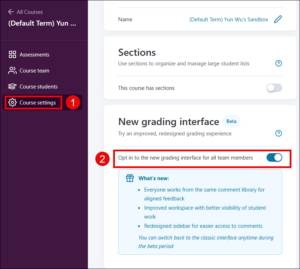
Note: This interface is currently in beta and must be manually enabled by course instructors for each Crowdmark course. To enable:
- Navigate to Course Settings in your Crowdmark course.
- Enable Opt in to the new grading interface for all team members.
What’s New?
- Expanded grading canvas to give graders more room to work and support upcoming features.
- Updated comment experience with a cleaner toolbar at the bottom of the screen; comments are shown as pins that can be hidden or displayed, and the comment library now resides in the right-hand sidebar with search and sorting.
- Improved right-hand sidebar functionality allowing manual score entry, navigation between questions or booklets, and access to “Next Ungraded” at the top.
- Enhanced evaluation display using avatars to show evaluators, with a star indicating the primary evaluation and clickable details.
- Improved tag management with simple application of existing tags or creation of new tags.
- Expanded overview grid to provide a cleaner and more organized view.
Key benefit: Streamline the grading and feedback process by providing a more organized workspace and easier navigation.
Learn more: Watch this brief Crowdmark video overview [3:00 min]: Updated grading interface